

Kanban layout
A status pipeline board — groups by one field, drags to move, built on @dnd-kit with explicit persistence.
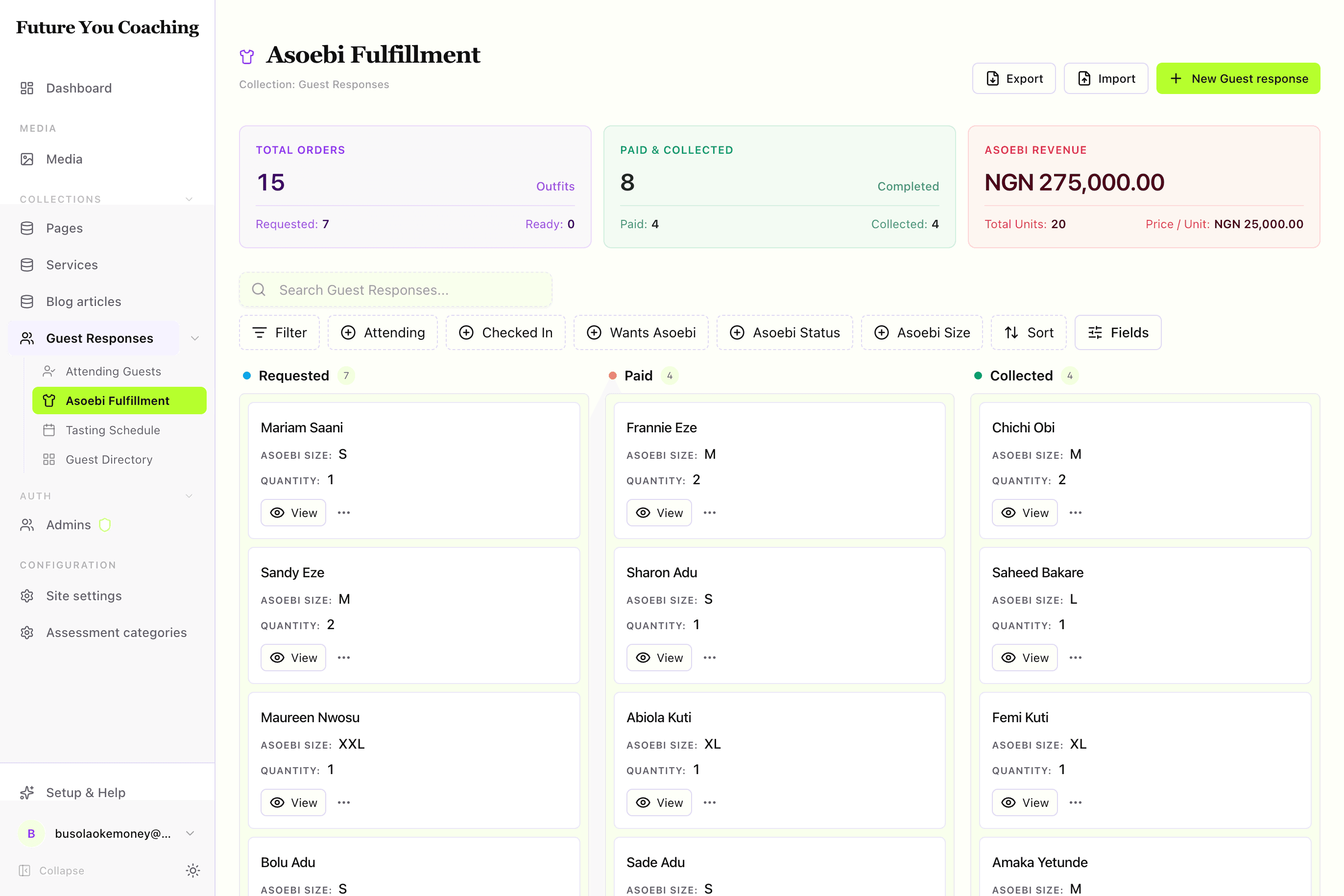
A kanban board is a table tipped on its side. Each column is a distinct value of one field (groupBy), each card is a document, and dragging a card writes that field. When the job is "move outfits from requested → paid → collected," a board reads instantly where a filtered table doesn't.
By the end you should know when a board is the right tool, which keys to set, and what the admin will render for moveMode: "update" vs moveMode: "action".
Visual outcome
When to use
- Use when: You are modeling a clear status pipeline with 3–5 distinct phases (e.g.
requested→paid→collected, orapplied→interviewing→offered). - Don't use when: The grouping field has more than 6 distinct values, is a free-text field, or when editors are doing bulk data exports rather than moving items between stages.
Complete example
Configure a Kanban pipeline with dedicated card action buttons and drag-and-drop grouping:
import { defineView, defineAction } from "@dyrected/core";

const markPaidAction = defineAction({
  name: "markPaid",
  label: "Mark Paid",
  icon: "CreditCard",
  type: "row",
  mutation: { asoebiStatus: "paid", asoebiPaidAt: "now()" },
});

const markCollectedAction = defineAction({
  name: "markCollected",
  label: "Mark Collected",
  icon: "PackageCheck",
  type: "row",
  mutation: { asoebiStatus: "collected", asoebiCollectedAt: "now()" },
});

export const asoebiPipeline = defineView({
  slug: "asoebi-pipeline",
  label: "Asoebi Fulfillment",
  icon: "Shirt",
  layout: "kanban",
  filter: { asoebi: { equals: true } },
  groupBy: "asoebiStatus",
  columns: ["name", "asoebiSize", "asoebiQuantity"],
  actions: [markPaidAction, markCollectedAction],
});
Setting groupBy: "asoebiStatus" creates board columns corresponding to the options on the field. columns specifies the fields displayed as metadata chips on each card, and actions surfaces direct execution buttons right on each card.
Drag-and-drop persistence
You can control how dragging a card to a new column updates the underlying document:
| Mode | What happens on drop | Example Configuration | When to use |
|---|---|---|---|
moveMode: "update" | Directly updates the groupBy field to the target column value. | defineView({ groupBy: "status", moveMode: "update" }) | Simple status progressions without additional side effects. |
moveMode: "action" | Triggers a defineAction mutation, running custom expressions, timestamps, and validation hooks. | defineView({ groupBy: "status", moveMode: "action", moveAction: "markPaid" }) | Multi-field mutations (e.g. setting paidAt: "now()"), confirmations, or custom backend handlers. |
All card moves run through access control and trigger optimistic UI updates with live feedback.
UX guardrails
- Columns 3–5: Focus on the active operational pipeline. Hide archival or dead-end states in a filtered table view.
- Card metadata: Display the primary title prominently, followed by 1–2 key metadata badges (
size,quantity). - Unassigned bucket: If any documents lack a value for the
groupByfield, Dyrected displays an Unassigned column so no records are lost.
Next steps
- Define custom action mutations — Actions
- Add pipeline metrics — Metrics
- Best practices & anti-patterns — UX guidelines
- Explore other layouts — Table, Calendar, Cards, Spreadsheet